Jewelry Identifier Gem Scanner
- 4.4
- Rating
- 100.00K
- Installs
- Free
- Price
 Analysis by App-foxy
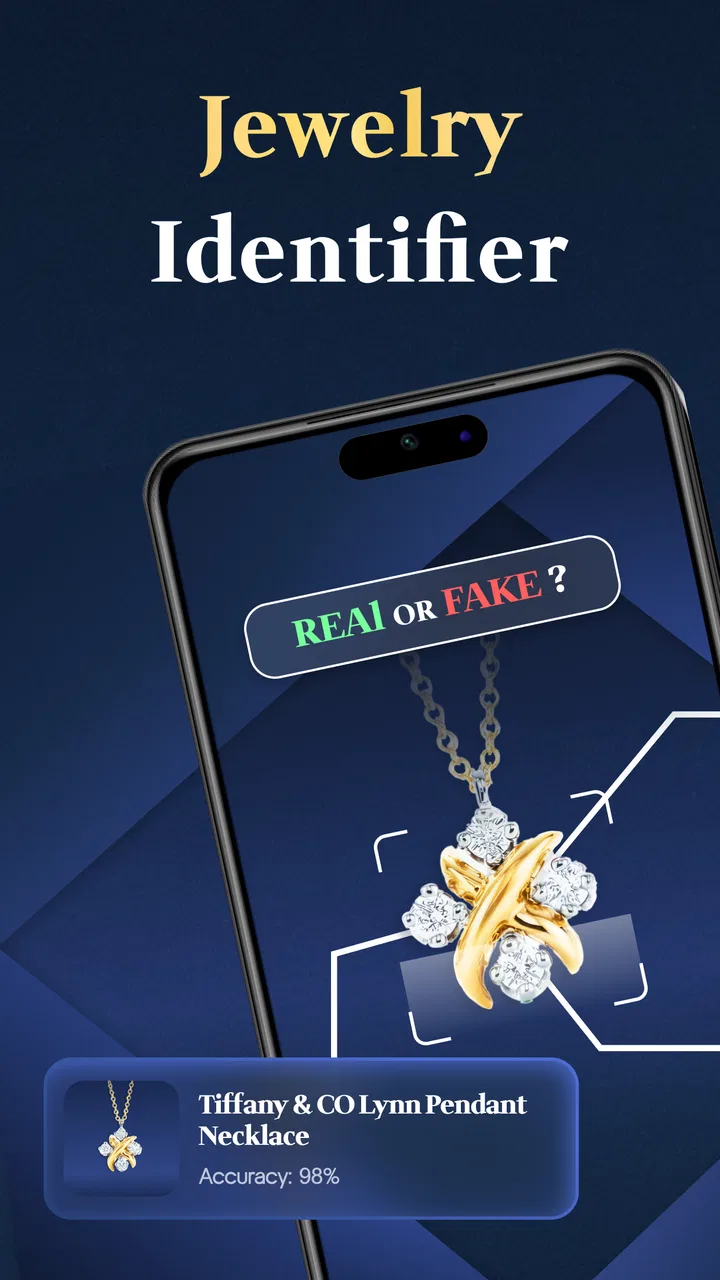
When I first open a jewelry identification app, I want a quick starting point rather than a complicated lesson in gemology. Jewelry Identifier Gem Scanner is built around that simple idea: use a photo to get an initial identification for a piece of jewelry or a gemstone. It belongs to the Business category, comes from Identifier Studio, and is free to install, with optional in-app purchases ranging from $4.99 to $49.99 per item. My first impression is that it is most useful as a convenient screening tool, not as a replacement for a jeweler, gemologist, appraisal, or laboratory report.
The app has a 4.4 average from around 4.2 thousand ratings and has passed 100 thousand installs, which suggests that the photo-based approach appeals to plenty of curious owners. It is rated Everyone, so the interface and general subject matter are suitable for a broad audience. It was released on March 13, 2025, and version 1.16 requires Android 11 or later. Those details matter if you are using an older phone, but on a reasonably current Android device the main question is simpler: can a photograph give you a useful first clue about what you are holding?
From the first photo to a useful result
I find the first scan most useful when I treat it as a small, repeatable check rather than a verdict: one item, a clear image, and a result I can compare with what I already know. That framing also makes it easier to decide whether a second photo or a jeweler’s opinion is the sensible next move.
You May Also Like

 Blood Strike: 2.5 Anniversary
Blood Strike’s Loadouts Turn Every Drop Into a Tactical Gamble
A close look at Blood Strike’s custom loadouts: how fast access to signature weapons reshapes its battle royale rhythm, rewards preparation, and narrows the gap between fights.

 Pandora - Music & Podcasts
Pandora’s Music Is Easy to Start, but Harder to Recover
Pandora’s strength is its low-effort path from a seed to a station. Its weak spot is how much confidence it asks you to place in connection, setup, and quiet recovery.

 8 Ball Pool
8 Ball Pool Is Built on Rivalries, Rematches, and Routine
A close look at the rivalries, rematches, shared routines, and unanswered safety questions that turn a quick pool match into a persistent mobile community.

 Samsung Music
Samsung Music’s Quiet Strength Is Playing What You Already Own
Its reach comes less from spectacle than from dependable access to a personal library. That simplicity is both the app’s strongest retention engine and its ceiling.

 AccuWeather: Weather Radar
AccuWeather Review: A Quick, Clear Forecast for Everyday Decisions
For everyday plans, the best forecast is the one you can understand quickly. AccuWeather makes rain timing, radar, and local conditions easy to act on, with a few trade-offs.

 Hill Climb Racing
Why Hill Climb Racing Still Turns Crashes Into One More Run
A tiny car, a bumpy hill and one more upgrade: Hill Climb Racing keeps resurfacing because its simple chaos makes every near-miss feel personal.
More From Our News Desk



What to expect before you begin
I would set expectations carefully. A photo can show visible characteristics such as color, shape, cut, setting, and surface appearance, but it cannot reliably reveal every property that separates one gemstone from another. Two stones can look similar under ordinary lighting, while a convincing-looking piece may be synthetic, treated, or made from a different material than its appearance suggests. That is why I treat the result as a starting point for research rather than a final valuation.
This distinction is especially important with jewelry. Identifying a loose stone is one task; identifying a complete ring, pendant, or pair of earrings is another. The metal, mounting, reflections, wear, and surrounding stones can all influence what the camera sees. If you are trying to understand an inherited ring, checking a second-hand purchase, or sorting pieces in a personal collection, the app can help organize your questions. It should not be the only reason you decide to buy, sell, insure, or repair something valuable.
The strongest use case is curiosity backed by a sensible workflow. You photograph the item, note the suggested result, compare it with visible details and any paperwork you already have, then decide whether professional verification is worthwhile. That process makes the app more useful than simply accepting the first label on screen.
Getting ready for the first scan
After installing it, I would begin with an uncomplicated object rather than the most valuable piece in the house. A loose, clean stone or a simple piece of jewelry is easier to photograph than a dark ring covered in reflections. Place it on a plain surface, remove distracting objects from the background, and use steady light. A bright window can work well if the stone is not directly catching harsh sunlight, which may create glare and hide the details the camera needs.
Before taking the picture, wipe away fingerprints and dust with a suitable soft cloth. This is a small step, but it prevents a cloudy surface from being mistaken for the natural appearance of the stone. I also prefer taking more than one view when possible: a straight-on image for color and shape, then an angled image that shows the setting or side profile. Even if the app is designed for a single photo workflow, preparing better images gives the identification process a fairer chance.
Keep the phone still while capturing the item. A blurry image is not made more useful by being close, and a very close image can crop away the setting or the edges that help distinguish a cut. I would start with the entire object visible, then try a closer composition only if the first result seems too broad. This is one of the practical trade-offs of a camera-based identifier: detail helps, but context also matters.
The first successful action
The first meaningful success is not merely seeing a name. It is getting a plausible suggestion that gives you a sensible next question. For example, if the app points toward a particular gemstone family, I would compare that suggestion with the stone’s color, transparency, cut, and the description from the seller or family records. If the visual clues disagree, I would treat the disagreement as useful information rather than forcing the app’s result to fit.
For a smooth first attempt, I would photograph a single prominent stone instead of a crowded jewelry box. Avoid placing several rings or necklaces together, because the camera may have difficulty deciding which object is the subject. Keep the main stone centered and make sure its edges are visible. Then read the result slowly and separate what the app appears to identify from what you are personally hoping it will be.
This approach is particularly helpful for beginners because it turns an intimidating object into a short investigation. You do not need to know every gemological term before starting. You can use the suggested identification to learn which visual features deserve attention, then repeat the process with a better image if the first attempt looks uncertain or surprising.
A useful habit is to save your own notes alongside the result, even if the app does not provide a dedicated collection workflow. Record where the item came from, whether it is loose or mounted, and whether the color changes under different light. Those details can prevent confusion later when several stones produce similar-looking suggestions. The app gives you a quick visual reference; your notes supply the context that a photograph cannot.
Common confusion about photo identification
The most common mistake is treating a visual match as proof of authenticity. A camera cannot establish whether a gemstone is natural, lab-created, or an imitation simply because the color and cut look right. Treatments can also affect appearance without being obvious in a casual photograph. If the item has meaningful financial or sentimental value, a professional examination remains the safer next step.
Another source of confusion is the difference between identifying a stone and identifying the whole piece. A ring may contain a central stone, accent stones, and a metal setting, but the photo may emphasize only one visible feature. Likewise, a reflective metal surface can alter the apparent color of a pale stone. I would therefore read the result as describing the visible subject in the image, not automatically every material used in the jewelry.
Lighting creates another trap. Warm indoor bulbs can make a white or pale stone appear yellow, while a strong flash can flatten its color and produce bright spots. A dark background may improve contrast for a light stone but make a deep-colored gem look heavier than it is. If a result seems strange, repeat the photo in neutral daylight before deciding that the item itself is unusual.
It is also easy to confuse identification with valuation. Knowing a likely gemstone name does not tell you the quality, provenance, condition, treatment history, or market value of a finished piece. A small, well-cut stone and a larger stone of lower quality can receive similar broad descriptions while having very different worth. I would never use a scan alone to set a selling price or determine insurance coverage.
Where this app fits among the usual alternatives
The usual alternative for a casual question is a web search using a photograph and a few descriptive words. That can uncover useful examples, but it often leaves you comparing dozens of visually similar images without a clear starting point. This app is more convenient when you want a focused first suggestion directly from the jewelry image rather than building a search phrase yourself.
Another alternative is asking a jewelry shop for an opinion. That is more personal and may reveal details a photo cannot, especially when the item is mounted or difficult to photograph. The trade-off is convenience: an app lets you make an initial check at home, while a professional visit is better suited to authentication, repair decisions, and value-related questions.
Specialist gemological testing is the strongest alternative when certainty matters. Testing can examine properties that a phone camera cannot see, but it is excessive for every piece in a drawer. I see Jewelry Identifier Gem Scanner as the middle step between blind guessing and formal examination. It is worthwhile when you want to sort possibilities, prepare questions, or decide which items deserve expert attention.
Everyday situations where it helps
Imagine finding an old pendant while clearing a relative’s belongings. You do not know whether the center stone is glass, a common gem, or something that deserves closer care. Photographing it with the app can give you a preliminary direction before you separate the piece from the rest of the collection. You can then bring the pendant and your notes to a jeweler with a more focused question instead of simply saying that it looks unusual.
It can also help when organizing jewelry for travel or storage. I would photograph individual pieces, write down the app’s suggested descriptions, and keep those notes with personal records. This does not create a formal inventory or prove what each item is, but it can make a mixed collection easier to sort. The key is to label the notes as preliminary identifications so they are not mistaken for certificates later.
A shopper considering a second-hand item may also use it as a quick screening step. If the visual result conflicts sharply with the seller’s description, that is a reason to pause and ask for documentation or professional inspection. If the two broadly agree, that is still not proof of quality or authenticity, but it may help you decide whether further investigation is worth your time.
Who should use it, and who should skip it
I recommend it to curious jewelry owners, beginners learning basic gemstone vocabulary, collectors sorting unlabelled pieces, and shoppers who want a quick visual clue before doing more research. It is also a practical conversation starter when you are preparing questions for a jeweler. The free entry point makes that first experiment easy, although the presence of optional purchases means I would review any upgrade screen carefully before paying.
I would skip it as a primary solution if you need a certificate, a defensible appraisal, an insurance description, or a firm answer about whether a stone is natural. It is also a poor fit for someone who dislikes taking careful photos or expects every image to produce a precise result. Mounted stones, reflective surfaces, poor lighting, and visually similar materials can all reduce the usefulness of a camera-based suggestion.
The age rating of Everyone makes it approachable for families and younger learners, but adult supervision is still sensible when the app is being used around valuable jewelry. A child can enjoy comparing colors and cuts, while an adult should handle any decision involving money, cleaning, testing, or selling. The app is educationally useful when its results are treated as clues rather than authority.
My practical routine for better results
My preferred routine is simple. I start with one item, clean it gently, use neutral light, keep the phone steady, and capture an image that shows both the main stone and enough of its setting to provide context. If the result is unexpected, I repeat the scan from a slightly different angle instead of immediately assuming the item is rare or misidentified.
Next, I compare the suggested identification with information already available: purchase paperwork, a hallmark, a previous appraisal, or the seller’s description. I look for agreement and disagreement rather than trying to prove a preferred answer. When the stakes are low, that may be enough for organizing a collection. When the stakes are high, the disagreement tells me to stop relying on the app and seek an expert.
One less obvious tip is to photograph the same piece under consistent conditions if you are comparing several items. Changing the background, distance, and lighting for every image makes your own notes harder to interpret. A repeatable setup gives you a fairer visual comparison, even though it cannot turn a phone photo into laboratory testing.
Another useful trade-off is deciding whether to show the whole jewelry item or isolate the stone visually. A full view helps explain the setting and overall design, while a closer view may reveal the cut and surface more clearly. I would use both approaches when the item matters, then keep the results together rather than treating either image as definitive on its own.
Version, cost, and the decision to keep using it
Version 1.16 is available for devices running Android 11 or later. The app itself is free, which is convenient for a first trial, but optional purchases are listed at prices from $4.99 to $49.99 per item. I would begin with the free experience and decide whether it genuinely improves my workflow before considering any paid option. A purchase makes more sense for someone who uses the identifier repeatedly; it is harder to justify for a single inherited ring that will still need professional checking.
I would also judge the app by the quality of the questions it helps me ask, not by whether every result feels conclusive. A useful scan can narrow the possibilities, reveal that a seller’s description deserves scrutiny, or show that a piece is ordinary enough not to require further attention. That is real value, even when the correct outcome is deciding not to trust a visual identification on its own.
After using it, my recommendation is cautiously positive. Jewelry Identifier Gem Scanner is an approachable first step for photo-based gemstone and jewelry exploration, and Identifier Studio has kept the concept focused enough for a beginner to understand quickly. Its best role is as a pocket reference for preliminary identification and collection organization. If you remember one rule, make it this: use the scan to guide your next question, never to replace professional verification when the answer affects money or authenticity.
For a first-time user, the path is reassuringly clear: install it on a compatible Android phone, choose an uncomplicated piece, take a clean and steady photo, read the suggestion as a clue, and compare it with independent details. If the result is useful, repeat the process with the rest of your collection. If it conflicts with the evidence or the item is valuable, take that conflict to a qualified jeweler or gemologist. That balance is what makes the app worth trying without asking it to do more than a phone camera realistically can.
FAQs for Jewelry Identifier Gem Scanner
01What is Jewelry Identifier Gem Scanner and what can it identify?
Jewelry Identifier Gem Scanner is designed to help users examine jewelry and gemstones using a smartphone camera and app-based analysis tools. It may provide information such as a possible gemstone type, jewelry style, or visual characteristics. However, results should be treated as an initial reference rather than a professional appraisal, especially when identifying valuable diamonds, colored stones, precious metals, or antique pieces.
02How accurate is Jewelry Identifier Gem Scanner?
The app can be useful for learning about visible features, but its accuracy depends heavily on image quality, lighting, camera focus, and the condition of the jewelry. A phone cannot reliably confirm every gemstone, treatment, metal purity, or imitation material. For expensive or sentimental items, compare the app’s suggestions with a qualified gemologist, jeweler, or certified laboratory before making a purchase or sale.
03Do I need special equipment or an internet connection to use the app?
Most users can begin with a compatible Android or iOS device and its built-in camera. Good natural or white lighting, a clean lens, and several sharp photos usually produce better results than dark or blurry images. Depending on the app version, some analysis features may require an internet connection, while basic browsing or previously loaded information may remain available offline.
04Is Jewelry Identifier Gem Scanner suitable for valuing jewelry?
The app should not be considered a replacement for a formal valuation. Identifying a possible gemstone or jewelry category is only one part of determining value. Cut quality, carat weight, color, clarity, provenance, craftsmanship, condition, market demand, and certification can all affect the price. Use the app for preliminary research, then consult an independent professional for an accurate appraisal.
05What privacy considerations should I know before uploading jewelry photos?
Before using the scanning or analysis features, review the app’s privacy policy and requested permissions. Jewelry photographs may be processed on the device or uploaded to an online service, depending on how the feature works. Avoid including personal documents, addresses, faces, or other sensitive details in images. Also check whether photos are stored, shared, or used to improve the service.
Pros
- Identifies many common gemstones from a quick camera scan.
- Useful reference for learning basic gem characteristics and terminology.
- Simple interface makes scanning accessible for first-time users.
- Can help organize initial research before visiting a jeweler.
- Convenient for checking stones while shopping or browsing jewelry.
Cons
- Results can be unreliable with poor lighting
- reflections
- or covered stones.
- Camera scans cannot replace professional grading or laboratory testing.
- Rare
- synthetic
- and treated gems may be misidentified.
- Some features or detailed results may require a paid upgrade.
- The app may collect image or device data depending on privacy settings.

Jewelry Identifier Gem Scanner
Gallery